Cut List
Lists the bars of a welded frame the way a fabricator needs them: how many of each, what profile, how long to cut them, and the angle at each end. Use it for frames, racks and tables built with Sweep (a closed profile along a path of lines and arcs, corners mitred) or with long Extrude bars. It also lists the other bodies of the model, such as plates, with their sizes.
What you get: a window with one row per kind of bar (quantity, profile, cut length, both end angles and the total length), the other bodies with their sizes, and a CSV file for the saw or the spreadsheet when you ask for one.
Step by Step
- Build the frame first: a Structural Member step, a Sweep of a closed profile along a path, or long Extrude bars.
- Click Cut List on the Fabrication tab. The Cut List window opens.
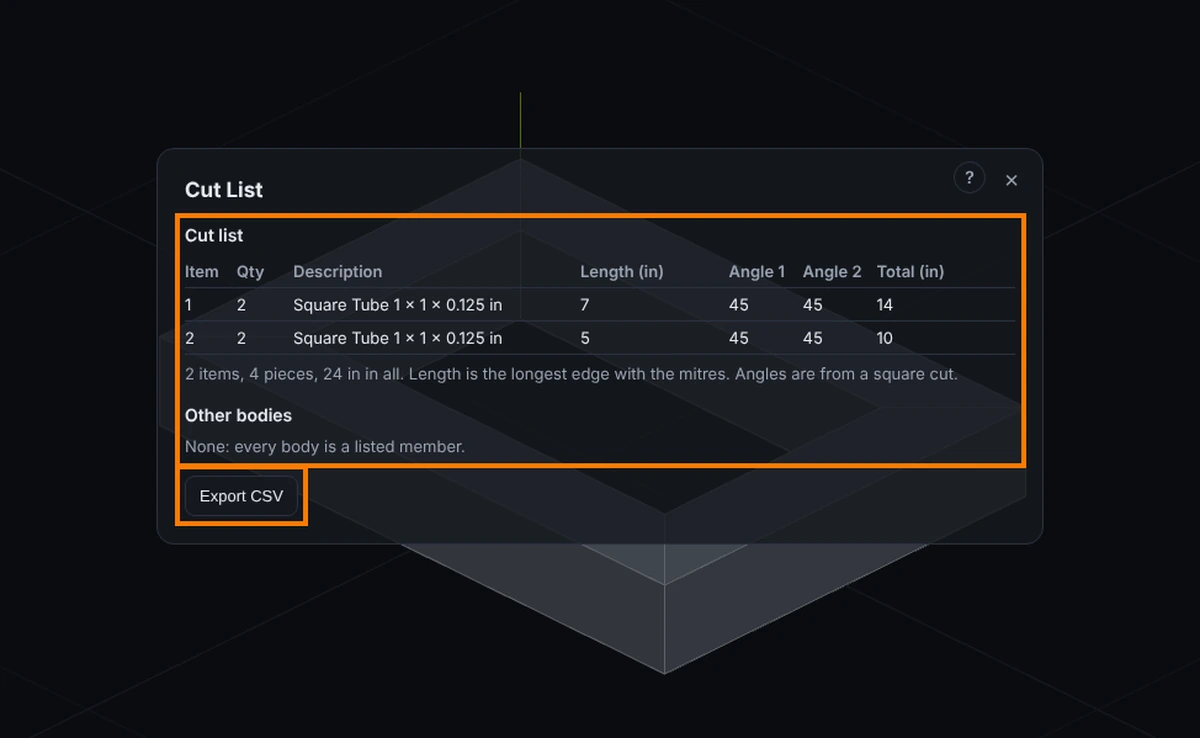
- Read the list: Item, Qty, Description, Length, Angle 1, Angle 2 and Total, with a line under it that counts the items, the pieces and the total length.
- Read Other bodies under it for plates and anything that is not a bar, and Not listed for bars the list left out, with the reason.
- Press Export CSV to save the list as a spreadsheet file. Save as PDF saves a PDF and Excel (paid plans) saves an Excel file; see Save a Bill of Materials or Cut List as PDF or Excel. Saw nest... cuts the members from stock lengths: sticks to pull, saw cuts and drops; see Nest.
- Press X or Esc to close the window.
How to Start It
Click Cut List on the Fabrication tab. The list is worked out from the steps in the Model tree each time you open it, so it is always current. Steps below the blue rollback bar are not counted. The window shows the list; Export CSV saves it as a spreadsheet file (a name that starts with =, +, - or @ gets a leading apostrophe, so a spreadsheet never runs it as a formula); X or Esc closes it.
What Counts as a Member
- A Sweep that adds material. A sweep makes one body for the whole path, with the corners mitred for you, so the list has one row per piece of the path: every straight piece is a bar with its own length and its own two end angles, and every arc is listed as a bend at its centre line arc length with angles of 0 (an arc joins its neighbours smoothly). A Circular profile sweep counts too, as a round bar.
- A Structural Member step: one member per line of its sketch, of the shipped stock or of one of your own profiles (named after the profile; two custom outlines are one item only when their corners match).
- An Extrude that adds material, when its depth is at least twice its largest width (a bar, tube or rod). A shorter extrusion is a plate or block and goes under Other bodies. Thin Feature extrusions and Direction 2 extrusions are not read as members.
- Suppressed steps and cuts are not members.
The Columns
- Item and Qty: identical bars are ONE item with a quantity. Bars are identical when they have the same profile and the same cut length (within a hundredth of a millimetre) and the same two end angles (within a hundredth of a degree), and their mitres cut across the same face of the profile the same way (parallel or opposed), even if one is the other turned end for end: the two mitred legs of an L frame (0 and 45 at one, 45 and 0 at the other) are one item of quantity 2, and the four sides of a square frame are one item of quantity 4. Bars of different lengths are separate items. A bar and its mirror image are the same bar and join the same item.
- Description: for a hollow rectangular profile, for example "25 x 25 x 2 mm tube" (outside width, outside height, wall); for a round tube, "30 x 2 mm round tube"; for a solid round profile, "round bar 30 mm diameter"; for anything else, "profile 40 x 20 mm" (the size of the box round it).
- Length: the longest edge of the bar along its axis, mitres included. This is the length to cut the stock. It is longer than the centre line of the path by about half the profile width times the tangent of the angle, at each mitred end.
- Angle 1 and Angle 2: the mitre at each end, measured from a square cut. The two angles of an item are always listed with the smaller first, so a leg mitred 45 at its start and 0 at its end reads 0 and 45, the same as its twin. A square cut is 0. A 90 degree corner in the path is mitred 45 degrees on each bar; a 60 degree turn is mitred 30. A free end is 0.
- Total: Qty times Length.
Closed Frames
A path that ends where it began (a square or a rectangle) is read as a closed frame: all four corners are mitred, so each bar is 45 and 45 and the four bars are one item of quantity 4 (a rectangle gives two items of quantity 2).
Other Bodies
Any body of the model that no member accounts for is listed with its name and the size of its bounding box (length along x, width along y, height along z). A body made by joining a bar to a plate is not a bar on its own: it is listed here with the box of the whole joined body, and its bars are still in the cut list above. Parts opened from a file with no steps are listed here too.
Units
Lengths show in the unit chosen in Settings, as decimals with the number of decimals set there. The unit is in each column heading and in the CSV headings.
Not Listed
A sweep is left out, and the window says why, when its profile is not square to the path or does not sit on the first point of the path, when it twists along the path, when its path is a closed circle, when the path doubles back on itself, or when the path has more than 2000 pieces. A bar is also left out when a later step may have changed it (see Tips). A Pattern is left out when its copies overlap, and the list stops adding copies at 5000 members in all.
Tips
- Later steps that change a bar. A Move/Copy Bodies step that moves or turns bars moves them in the list too (a copy of a bar is a bar), and Delete Body takes its bars out. Scale, Combine, a Cut that reaches a bar, and Hole, Shell, Fillet, Chamfer, Draft or Rib steps (which the list cannot follow exactly) take the bars they may change out of the list, and the window names each one under Not listed, so a length that may be out of date is never shown. A body that holds bars together with other material, when it is moved, copied or deleted, is also named under Not listed.
- Trim/Extend. A member cut back or run on by a later Trim/Extend, To a face or Mitre, is listed at its new length, with the new end's angle from square, worked out exactly from the plane it was cut to (a round tube on its rim). For example, a 50 x 50 x 3 mm square tube L of 1000 mm and 600 mm made with Butt 1 and then mitred with Trim/Extend lists the first member 1025 mm at 0 and 45 degrees and the second 625 mm, the same as a mitred Structural Member. The other end of the member stays as it was. A member fitted To a body (its end shaped to another body), one trimmed to a slanted face picked in an older version (which did not record the face's plane), and an end the list cannot match to one member for sure are taken out of the list and named under Not listed: check their lengths.
- Split and Intersect. A Split plane square to a straight bar with square ends cuts it into two bars of the right lengths, and an Intersect that keeps one side of such a plane, or a box lined up with X, Y and Z around the bar's sides, trims it to the length kept. A bar left with nothing inside the region is gone from the list. A cut at an angle, through a mitre or a bend, or to the shape of another body takes the bar out of the list and names it under Not listed: check its length.
- Pattern and Mirror copies are counted. A Pattern step (a row, a grid or a circular pattern) of a Sweep or a long Extrude adds one more member for each copy, and a Mirror step (of the bodies or of chosen features) adds one more for each member it reflects, so a pattern of 3 identical bars is one item of quantity 3. The list reads the settings recorded in the step. A row or grid Pattern whose copies overlap each other is not counted (they fuse into one body, and the window says so under Not listed); in a circular pattern keep the bars apart yourself, because that is not checked, and a bar that lies on or across the mirror plane (its own reflection) is not counted twice. Copies of a Pattern or Mirror made inside a sketch are not bars until you extrude them. A Mirror that picks bodies copies the bars inside those bodies' boxes.
- To see a plate under Other bodies by itself, keep it a separate body: turn Merge result off when you make it.
Common Mistakes and Messages
- "No weldment members found. A member is a Sweep of a closed profile along a path of lines and arcs, or an Extrude of a long bar (at least twice as long as it is wide). Make one, then open this list again." Make a Structural Member, a Sweep of a closed profile along a path, or an Extrude at least twice as long as it is wide, and open the list again.
- A sweep is under Not listed: draw the profile on the plane where the path starts, with the first piece of the path square to that plane.
- A bar you trimmed or cut is under Not listed. A later Cut, Fillet, Hole or similar step may have changed it, so its length is not shown. Check that length by hand.
- A short block is under Other bodies, not in the list. An Extrude counts as a bar only when its depth is at least twice its largest width.
- The list misses a step. Steps below the blue rollback bar are not counted. Drag the bar to the bottom of the Model tree and open the list again.
Related
See Sweep, Extrude, Pattern and Mirror Features.