End Cap
End Cap closes the open end of a tube or pipe with a flat plate. It is made as a new body of its own, the way a welded cap is a separate piece, and it is one step in the Model tree.
What you get: a flat plate of the thickness you typed over (or inside) the open end of the tube, as a new body named in the Bodies list and the Cut List.
When to Use It
- Close the ends of square or round tube legs and posts
- Cap a rail so water and dirt stay out
- Fit a plug plate inside the end of a tube, set in a little for a fillet weld
Step by Step
- Open the model for modeling, then click End Cap on the Fabrication tab (on the Features tab in the other layout). The End Cap panel opens.
- Click the flat end face of the tube, the ring around the opening. It is lit orange. Click it again to drop it.
- Type the Thickness. It starts at 1/4 in (6 mm). You can type any unit, like 3/16 in or 5 mm.
- Set Offset if you want the cap smaller than the tube, and tick Inward to fit the cap inside the opening.
- Click End Cap. A message such as "End cap made, 0.25 in thick." gives the new volume of the part.
The End Cap button stays grey until an end face is picked.
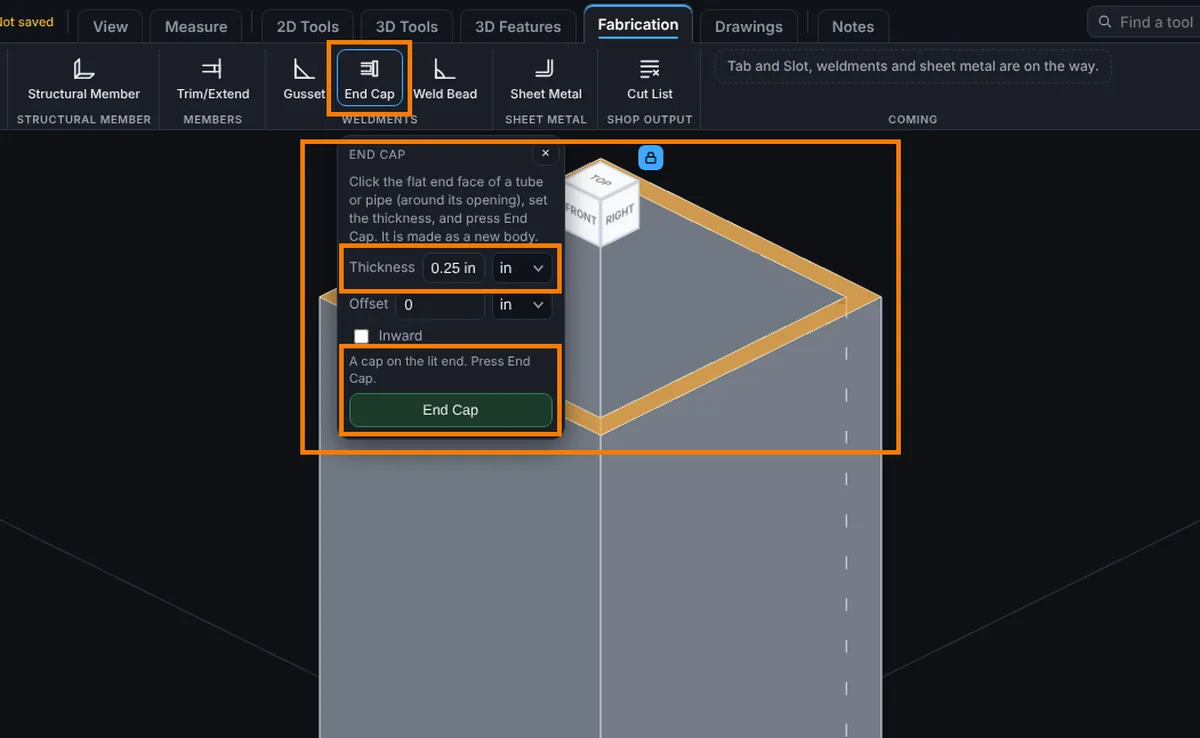
Options
- Thickness: how thick the cap plate is.
- Offset: brings the edge of the cap in from the outline by this much all round. On the end (Inward not ticked) the cap is the outside of the tube made smaller, which leaves a ledge for a weld; it must be less than the wall thickness so the cap still sits on the wall. With Inward ticked it is the gap between the cap and the inside wall. 0 makes it flush.
- Inward: unticked, the cap sits on the end of the tube and makes it longer by the thickness. Ticked, the cap fits inside the opening.
- Inset: Inward only. How far the cap is set into the tube from its end. 0 is flush with the end.
How Big It Is
On the end of a 2 in square tube, a 1/4 in cap is 2 x 2 x 0.25 = 1 cubic in. In mm, a 50 mm square tube with a 6 mm cap gets 50 x 50 x 6 = 15000 cubic mm. With an Offset of 1/16 in the cap is 1.875 x 1.875 x 0.25 = 0.879 cubic in. Square corners stay square when the cap is brought in.
Edit It Later
Right-click the step in the Model tree and choose Edit Feature. You can change the Thickness, Offset, Inward and Inset in place, without picking the face again. The step is named End Cap and sits in the Bodies group.
Tips and What to Expect
- The face must be flat with one opening in it: the end of a tube or pipe, square, rectangular or round.
- The cap is a new body, so it shows in the Cut List and the Bodies list on its own. Use Combine if you want it joined to the tube.
- An open shape like an angle or a channel has no opening to close, so End Cap does not work on it yet. Draw a plate and Extrude it instead.
- Corner rounds or chamfers on the cap are not made. Use Round and Chamfer on the cap afterwards if you need them.
- There is no dashed preview yet: press End Cap and use Undo if the result is not what you wanted.
Common Mistakes and Messages
- "That face has no opening in it, so there is nothing to close." You clicked a solid face, such as the end of a solid bar. Click the end face of a tube, the ring around the opening.
- "An end cap goes on the flat end of a tube, and that face is curved. Click the flat end face around the opening." You clicked the round outside of a pipe. Click its flat end instead.
- "An offset of ... leaves nothing of the cap (the end is not that wide). Type a smaller offset." Type a smaller offset.
- "An offset of ... brings the cap in past the wall of Body 1, so it would sit over the opening touching nothing." On the end, the Offset must be smaller than the wall is thick, so the cap still sits on the wall. Type a smaller offset, or tick Inward.
- "An inset of ... and a thickness of ... run past the far end of Body 1 (or past where its wall changes). Type a smaller inset or thickness." The tube is not that long. Type a smaller inset or thickness.
- "That end cap would run into Body 2." Something sits against the end. Pick the open end, or move what is in the way.
- "The face this end cap closes is no longer on the part." An earlier step changed or removed it. Delete the End Cap step and make it again.