Download All My Records
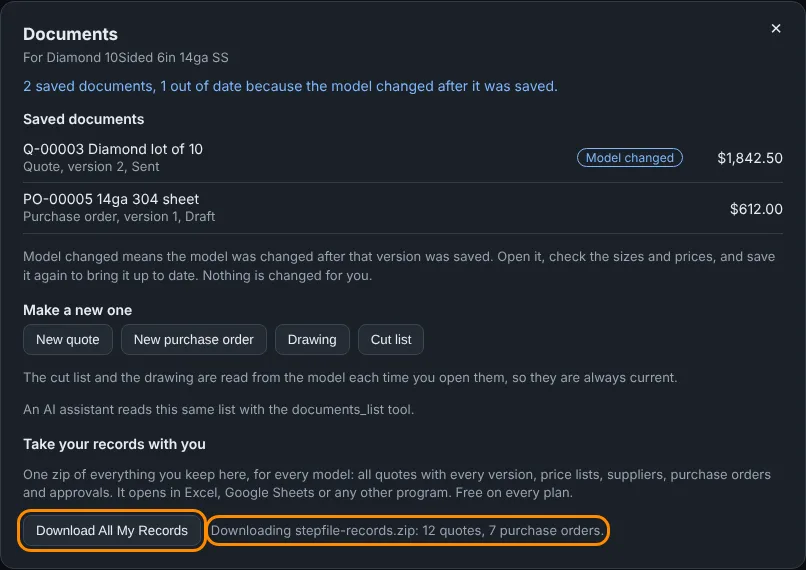
Saves everything you keep on the business side of StepFile.com as one zip file on your own computer: every quote with all its saved versions, your price lists, suppliers, every purchase order with all its versions, and the approvals of your models. It opens in Excel, Google Sheets or any other program, so none of it is locked inside StepFile.com. It comes on every plan and costs nothing.
When to Use It
- Keep a copy of your quotes and purchase orders outside StepFile.com
- Give your bookkeeper a spreadsheet of what you quoted and ordered
- Move to another system and take your records along
Step by Step
- Open any saved part or assembly. Records are for your whole account, but the button lives in the Documents window of a saved model.
- Click Documents (the tab, or File, then Documents...).
- At the bottom, under Take your records with you, click Download All My Records.
- The line next to the button reads Downloading stepfile-records.zip and says how many quotes and purchase orders are in it. The browser saves the file.
What Is in the Zip
- quotes.csv has one row per line of each quote's newest version, with its sheets, labor, margin and tax on rows of their own, so the Amount column adds up to the quote total. Open it in Excel or Google Sheets.
- purchase_orders.csv has one row per line of each purchase order's newest version, with the count received and the tax and shipping rows.
- records.json holds everything in full for another program: every version of every quote and purchase order, who signed off and when, price lists, suppliers, and approval events. Amounts are whole cents (1250 is 12.50). Times are UTC.
- README.txt says the same in a few lines.
What Is Left Out
Secret links. The one-time links emailed to customers and suppliers are never in the file, only who they were sent to, when, and what came back. Model files leave through File, Export (STEP, DXF) and File, Export, History.
The AI
An AI assistant connected to your account runs the same action with the records_export tool and gets the same private link. It changes nothing.
Common Problems
- The button says it could not be reached. Check your connection and press it again. Nothing was changed.
- Nothing downloaded. The browser may have blocked the download. Allow downloads for this site and try again. The link lasts 15 minutes.
- A description starts with an apostrophe in Excel. A description that began with = + - or @ is saved with a leading apostrophe so Excel shows it as text and never runs it as a formula.
- The spreadsheet shows odd characters for accents. Open it with File, Open in Excel or Import in Google Sheets and pick UTF-8.