Shared With
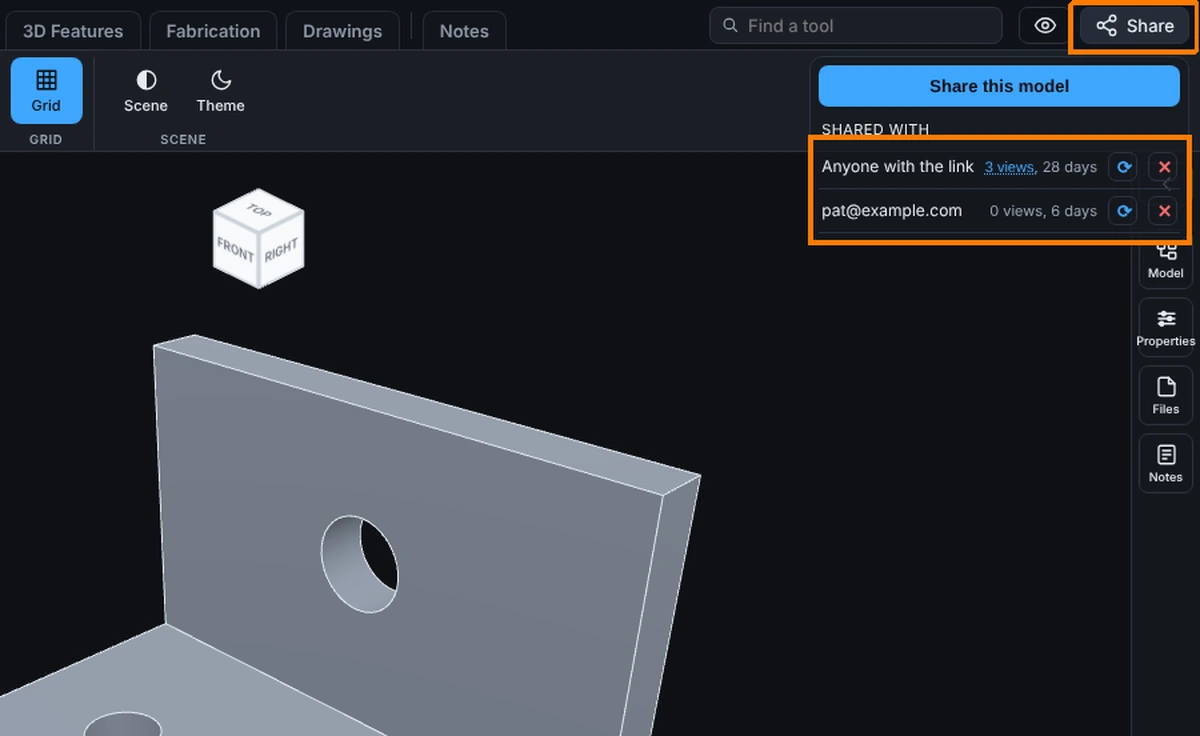
Click Share on a saved model and the menu shows Shared with: every live link for this model, one line each.
What you get: a list of who can open this model, how often each link was opened and how many days each has left, with a button to update or turn off each one.
What Each Line Shows
- Who has it: an email address, or Anyone with the link for the public link (there is only ever one).
- The number of views, then the days left, or soon when it is nearly up. Your own opens are not counted.
- A refresh arrow and an X.
Step by Step
- Click Share with a saved model open. With no links yet, it says Nobody yet. Only you can see this model.
- Click the underlined view count to list every open: when, on what kind of device, and who, if they were signed in. It shows the latest 500, and link previews by bots are left out.
- Click the refresh arrow to update the link to the current saved state. You are asked first. The link stays the same. Until you press it, a link shows the version you shared.
- Click the X to revoke. You are asked to confirm. The link stops working at once, and for an emailed person only that person loses access.
Common Mistakes and Messages
- "Update this link to show the current saved state of the model? The link itself stays the same." This is the question the refresh arrow asks. Save your changes first, or the link shows the last saved state, not what is on screen.
- "Share updated to the current saved state." The refresh worked; people with the link now see the new version.
- "Revoke access for ..." This is the question the X asks. Revoking cannot be undone: to let them back in, share the model with them again, which makes a new link.
- "Could not revoke." The link is still live, for example because the connection dropped. Try the X again.