Weld Bead
Weld Bead puts a fillet weld in the inside corner where two flat faces meet, like the weld where a post stands on a base plate. The weld has the usual fillet shape: both legs the same size, one along each face, with a straight face between their ends. It can run the whole corner, be broken into short stitch welds, or go all around a post or tube. The weld is made as a new body of its own, and it is one step in the Model tree.
What you get: a fillet weld of the leg size you typed, filling the inside corner of the two faces you picked, as a new body in the Bodies list and the Cut List.
When to Use It
- Show the weld where a post or tube stands on a base plate, all around
- Weld a rail or a member along the corner where it meets a plate
- Show stitch welds (short welds with gaps) along a long joint
- See how much weld metal a joint takes
Step by Step
- Open the model for modeling, then click Weld Bead on the Fabrication tab (on the Features tab in the other layout). The Weld Bead panel opens.
- Click the first flat face of the corner in the view, for example the top of the base plate. It is lit orange.
- Click the second face, for example the side of the post. It is lit blue. Click a lit face again to drop it.
- Type the Leg size. It starts at 1/4 in (6 mm). You can type any unit, like 3/16 in or 5 mm.
- Pick Continuous or Intermittent. For Intermittent, type the Length and the Pitch.
- Tick All around to weld right round the post instead of along one side.
- Read the line above the Weld Bead button. With both faces picked it says "A weld in the corner of the lit faces. Press Weld Bead." If it names a problem instead, the button stays grey until you fix it.
- Click Weld Bead. A message such as "Weld bead made, 0.25 in." gives the new volume of the part.
For example, a 1/4 in plate 3 in long and 2 in tall standing on a 6 in by 4 in by 1/2 in base plate (made as its own body) gets a 1/4 in weld along one side of 0.25 x 0.25 / 2 x 3 = 0.094 cubic in, and the part goes from 13.500 to 13.594 cubic in.
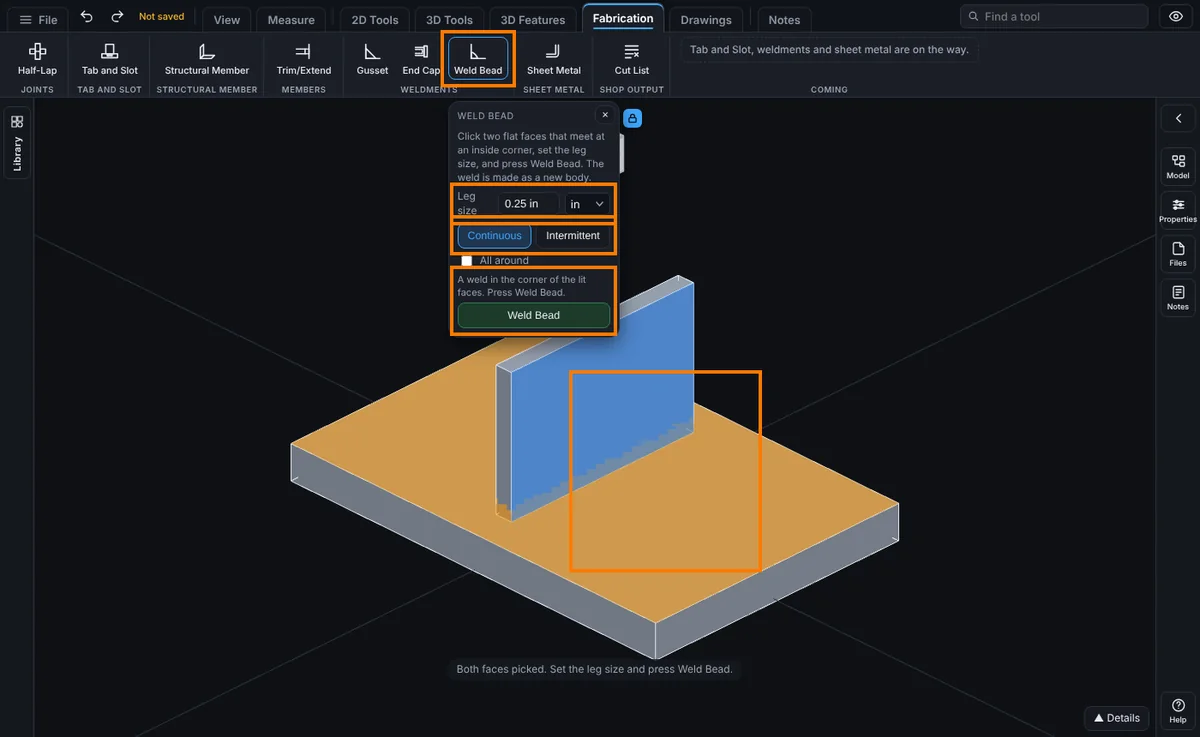
Options
- Leg size: the size of the fillet weld, how far it runs along each face from the corner. Both legs are the same.
- Continuous: one weld the whole way along the stretch of corner the two faces share. On a post standing on a plate, that is the width of the post side.
- Intermittent: short welds with gaps between them, often called stitch or skip welds. The welds are spread evenly about the middle of the corner, and what is left over is split between the two ends.
- Length: Intermittent only. How long each weld is.
- Pitch: Intermittent only. The distance from the start of one weld to the start of the next, as on a weld symbol. It must be longer than the Length.
- All around: the weld runs right round the member the second face belongs to, where it stands on the first face. Click the top of the base plate first, then any face of the post or tube. The second face may be the round outside of a pipe.
How Big It Is
A 1/4 in weld along a 2 in corner is 0.25 x 0.25 / 2 x 2 = 0.0625 cubic in. In mm, a 6 mm weld along a 50 mm corner is 6 x 6 / 2 x 50 = 900 cubic mm. All around a 2 in square post, a 1/4 in weld is 4 x 2 x 0.25 x 0.25 / 2 = 0.25 cubic in along the sides, plus four small corner pieces of 0.25 x 0.25 x 0.25 / 3 each, about 0.271 cubic in in all. When the two faces are not square to each other, the weld follows them, and its size is the leg times the leg over 2, times the sine of the angle between the faces, times the length.
Intermittent: 2 in welds at a 6 in pitch on a 24 in corner make 4 welds. They take 3 x 6 + 2 = 20 in of the corner, so 2 in is left at each end.
Edit It Later
Right-click the step in the Model tree and choose Edit Feature. You can change the leg size, Intermittent with its length and pitch, and All around in place, without picking the faces again. The step is named Weld Bead and sits in the Bodies group.
Tips and What to Expect
- Pick two faces that meet at an inside corner. The weld fills the open corner in front of both faces.
- The faces can be on one body (the inside of an angle) or on two bodies (a post standing on a plate).
- For All around, the post must be its own body (untick Merge result when you extrude it), with its flat end sitting on the first face, and its sides square to that face for at least the leg size.
- All around a square post, or any post with straight sides (a triangle too), the weld's outside corners are sharp (mitred), not rounded. Around a round tube it is round.
- The weld must lie on the faces you picked. A post on a second plate beside the first is not welded to the first, even at the same height.
- Each weld is a new body, so an intermittent weld of 4 welds adds 4 bodies. They show in the Bodies list and the Cut List. Use Combine if you want them joined to the part.
- A weld with two different legs, a weld along a curved corner (like a tube lying on a plate), a concave or convex weld face, and groove welds are not offered yet. Picking edges is not offered either: Weld Bead works from two faces.
- Intermittent works along one corner. All around is always continuous.
- There is no dashed preview yet: press Weld Bead and use Undo if the result is not what you wanted.
Common Mistakes and Messages
The first four come in the line above the Weld Bead button, and the button stays grey until you fix them. The rest come after you press Weld Bead.
- "Click the first flat face the weld runs along (like the top of a base plate)." Nothing is picked yet. Click the first face in the view.
- "Now click the second flat face of the corner (like the side of the post)." Click the second face. With All around ticked it asks for any face of the member instead.
- "You picked the same face twice. Click two faces that meet at a corner." Click the lit face again to drop it, then pick the other face.
- "The pitch must be longer than the weld length: it runs from the start of one bead to the start of the next. Type a longer pitch, or pick Continuous." For Intermittent, the Pitch box must be more than the Length box.
- "The two faces are parallel (or nearly), so they never meet at a corner." Pick two faces that meet at a corner, like the top of a base plate and the side of a post.
- "The weld runs off the first face: all of it must lie on the face you picked." The faces meet at an outside corner, the post stands too near the edge for that leg size, or the post stands on a different plate from the one you picked (two plates side by side at the same height). Pick the face the post really stands on, or type a smaller leg.
- "That weld bead would run into Body 3." Something is in the corner. Move it, or type a smaller leg.
- "The weld length (...) is longer than the corner the two faces share (...). Type a shorter length, or pick Continuous." The corner is shorter than one weld. Type a shorter length, or pick Continuous.
- "That makes ... beads, more than 200 in one step. Type a longer pitch." Short welds at a short pitch on a long corner make too many beads. Type a longer pitch.
- "All around welds a member standing on the first face, and both faces are on Body 1." Make the post its own body, or untick All around.
- "Body 2 does not stand flat on the first face, so there is no outline to weld all around." All around needs the post's flat end sitting on the face. Untick All around to weld one side.
- "The sides of Body 2 are not square to the face for the leg size (they lean in, or the member is shorter than the leg)." The post leans in, or is shorter than the leg. Type a smaller leg, or weld each side with All around unticked.
- "A face this weld bead runs along is no longer on the part." An earlier step changed or removed it. Delete the Weld Bead step and make it again.