Tab and Slot
Tab and Slot joins two parts that meet at a square corner: the edge of a plate, or the end of a square or rectangular tube, standing on a flat plate. Tabs grow out of the edge and go right through the plate, and matching slots are cut through the plate, a little bigger than the tabs. The parts then lock in place before you weld them. Both changes are one step in the Model tree.
What you get: tabs on the edge of the standing plate or tube that go right through the plate under it, and matching slots cut through that plate, a little bigger than the tabs, all in one step.
When to Use It
- Locate a gusset, a rib or an upright plate on a base plate so it cannot slide while you weld
- Stand a square or rectangular tube on a base plate or a cap plate with tabs through it
- Make self fixturing parts for laser, plasma, waterjet or router cutting
- Cut the tabs and slots by the shop rule without working out the spacing by hand
Before You Start
You need two separate bodies. To make a second body, untick Merge result when you extrude it, or use Move/Copy Bodies to place a copy. The edge of the first body must rest flat on the face of the plate: touching, not overlapping and not floating above it. Tab and Slot is a Pro feature (Pro and up). On the Free and Advanced plans it shows grayed, and a click says to upgrade from your account page.
Step by Step
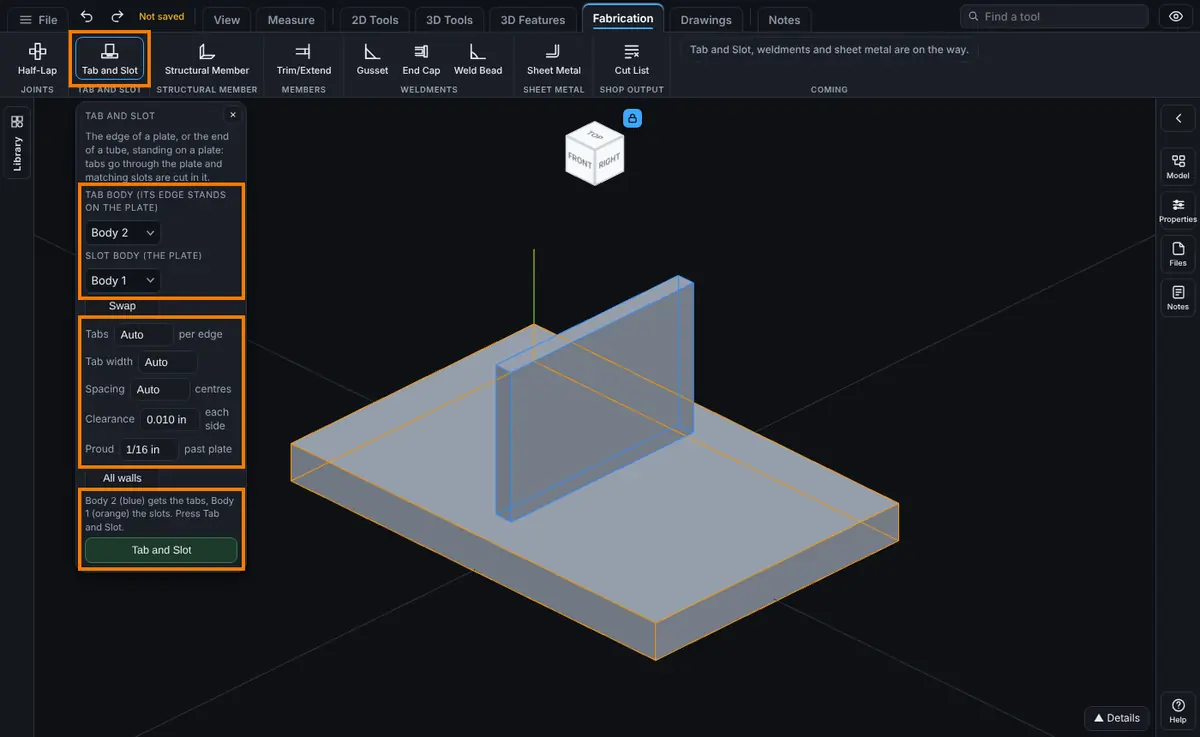
- Open the model for modeling, then click Tab and Slot on the Fabrication tab, next to Half-Lap. The Tab and Slot panel opens.
- Choose the Tab body: the plate or tube whose edge stands on the other part. It is outlined in blue.
- Choose the Slot body: the plate it stands on. It is outlined in orange. You can also click the bodies in the view: the first click is the tab body, the second the slot body, and a click on a picked body drops it. Press Swap if you picked them the wrong way round.
- Leave Tabs, Tab width and Spacing on Auto for the shop rule, or type your own.
- Check the Clearance and Proud.
- Read the line above the Tab and Slot button. With both bodies chosen it says which one is blue and gets the tabs, such as "Body 2 (blue) gets the tabs, Body 1 (orange) the slots. Press Tab and Slot."
- Click Tab and Slot. A message such as "Tab and Slot: tabs on Body 2, slots in Body 1." gives the new volume of the part.
For example, a 1/4 in plate 3 in long and 2 in tall (Body 2) standing on a 6 in by 4 in by 1/2 in base plate (Body 1) gets one tab 1.5 in wide with the defaults: half the 3 in edge. The tab adds 1.5 x 0.25 x 0.5625 = 0.211 cubic in (through the plate plus 1/16 in proud), the slot takes away 1.52 x 0.27 x 0.5 = 0.205 cubic in, and the part goes from 13.500 to 13.506 cubic in.
Options
- Tab body: the plate or tube that gets the tabs. It keeps its name.
- Slot body: the plate that gets the slots. It keeps its name.
- Swap: trades the two bodies, so the other one gets the tabs.
- Tabs: how many tabs on each edge or tube wall, Auto or 1 to 50. Auto uses the shop rule: an edge up to 6 in long gets one tab half as long as the edge; a longer edge gets 2 in tabs, the first and last 2 in from the ends, and as many between as keep them at most 12 in apart.
- Tab width: how wide each tab is along the edge, in any unit, at least 0.5 mm (0.02 in). Auto with Auto tabs is half the edge for a single tab on an edge up to 6 in, else 2 in. Auto with a tab count is the smaller of 2 in and the edge length divided by twice the count (one tab on an edge up to 6 in is half the edge).
- Spacing: with a tab count, the distance from one tab centre to the next, with the group centred on the edge. Auto spreads the tabs evenly along the edge. With Auto tabs, Spacing is the most the tabs may be apart (Auto is 12 in). It must be at least 1 mm (0.04 in).
- Clearance: the gap on each side of each tab in its slot, from 0 to 5 mm (0.19 in). It starts at 0.015 in (the shop minimum for a tab in a slot), so each slot is 0.030 in wider and longer than its tab. 0 makes a tight fit.
- Proud: how far the tabs stand out past the far side of the plate, from 0 to 50 mm. It starts at 1/16 in. 0 makes them flush.
- All walls: for a tube end, puts tabs on all four walls. Off (the default) puts them on the two longer walls only. A plate edge has one row of tabs either way.
Edit It Later
Right-click the step in the Model tree and choose Edit Feature to change Tabs, Width, Spacing, Clearance, Proud and All walls in place. Type Auto in a box to go back to the shop rule. The step is named Tab and Slot and sits in the Bodies group. The bodies stay the ones you picked; to swap them, delete the step and make it again.
Tips and What to Expect
- A 100 mm long, 6 mm thick plate standing on a 10 mm plate gets one tab 50 mm wide with the defaults. The tab body gains 50 x 6 x 11.5875 = 3476.25 cubic mm (10 mm through the plate plus 1/16 in proud), and the plate loses a slot 50.508 x 6.508 x 10 = 3287.06 cubic mm. Afterwards the two bodies share nothing and touch.
- A 600 mm edge gets three 2 in tabs: one 2 in from each end and one in the middle.
- A 50 x 50 x 3 mm tube end gets one 22 mm tab on each of its two walls (half of the 44 mm flat inside the corners), or four with All walls.
- Every tab and every slot is checked by volume against the size it should be, so a result that came out wrong is refused, never kept.
- One step makes at most 50 tabs on an edge or wall and 100 in all. A step that takes longer than 30 seconds is stopped and the part left as it was; use fewer tabs, or two walls instead of all walls.
- The tabs run straight through the plate, square to its face. Angled joints are not handled yet.
- The slot body must be solid plate of one thickness under the whole joint. A tab cannot go into a tube wall yet, and a slot that would break out past an edge, into a hole or into a hollow is refused.
- Round tube, channel, angle, an edge with a notch or hole in it and other odd shapes are not handled yet; they are refused, not guessed at. Slot corners are sharp; there are no corner reliefs or instances to skip yet.
- If an earlier step changes the size of either body, or removes it, Tab and Slot stops and names the body. Delete the Tab and Slot step and make it again.
Common Mistakes and Messages
- "Tab and Slot is a Pro feature. Upgrade from your account page to use it." Tab and Slot is grayed on the Free and Advanced plans. Upgrade from your account page.
- "Pick the tab body: the plate or tube whose edge stands on the other plate." You pressed Tab and Slot with no tab body chosen. Choose it in the list, or click it in the view.
- "Tab and Slot needs two bodies: the plate or tube that gets the tabs and the plate that gets the slots. To make a separate body, untick Merge result when you extrude." The part is one body. Make the standing plate again with Merge result unticked.
- "Body 1 does not touch Body 2: its nearest edge is 0.5 mm away." The edge floats above the plate. Move the tab body the distance and way the message says, so the edge rests on the plate.
- "Body 1 and Body 2 overlap by ... mm3." The edge sinks into the plate. Move the tab body back until it just touches.
- "It is the other way round: Body 2 rests on Body 1. Press Swap so Body 2 gets the tabs and Body 1 the slots." The plate you picked as the tab body is the one being stood on. Press Swap.
- "Body 1 lies flat on Body 2." Tab and Slot joins an edge or a tube end standing on the plate, not a plate lying on another.
- "Only part of the edge of Body 1 rests on Body 2." The edge hangs past the plate. Move it so the whole edge sits on the plate.
- "The slots would run into each other: tabs ... mm wide with ... mm clearance need their centres more than ... mm apart..." or "The tabs (...) would run past the ends of the ... mm edge they sit on." Use fewer or narrower tabs, or change the spacing.
- "With all walls the slots at a corner of the tube would run into each other: the tabs are too wide for this tube. Make them narrower, or put tabs on two walls only." The tabs are too wide for the tube. Make them narrower, or turn off All walls.
- "The face of Body 1 that rests on Body 2 is not a plain plate edge or square or rectangular tube end (...)." The edge is a channel, an angle, has a notch or a hole, or the tube walls differ. Tab and Slot does not handle those yet.
- "The slots would cut Body 2 into 2 pieces." The plate is no wider than the slot. Use a wider plate or narrower tabs.
- "Slot 1 would break out of Body 2." The plate is not solid under the joint (an edge, a hole, a hollow tube or a thinner spot). Move the parts, or change the tabs.
- "A tab would run into Body 3." A proud tab hits another body below the plate. Make Proud smaller or move that body.