Half-Lap
Where two bodies cross, Half-Lap cuts a notch in each one so they slot together: square or rectangular tube crossing tube, bar crossing bar, or two flat plates crossing edge to edge (an egg-crate joint). One body takes a notch from the top, the other from the bottom, and the two notches add up to the height the bodies share, so the pieces fit flush.
When to Use It
- Tube frames and grids where members cross at the same level, square or at a slant (45 or 30 degree braces)
- Egg-crate dividers and slotted plate grids
- Lap joints in flat bar before welding
How to Start It
Click Half-Lap on the Fabrication tab. Half-Lap is a Pro feature (Pro and up), like the rest of modeling: on the Free and Advanced plans it shows grayed, and a click says it needs an upgrade from your account page. Modeling must be open, and the part needs at least two bodies that cross. To make a second body, untick Merge result when you extrude.
What to Pick
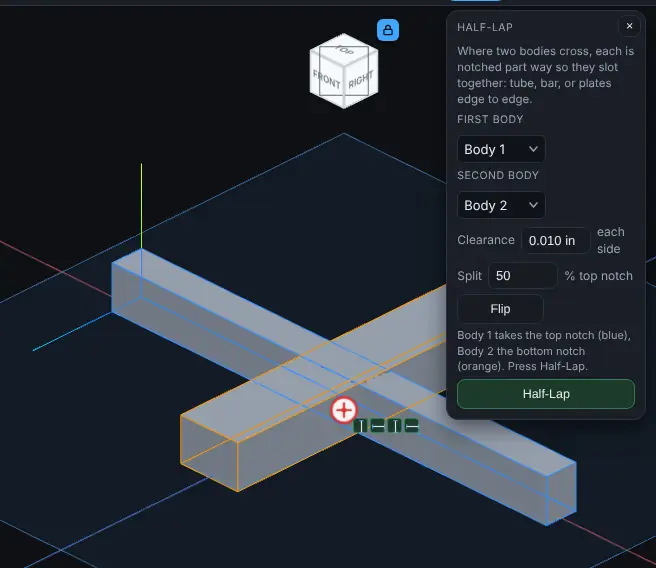
- First body and Second body: choose them from the two lists, or click them in the view (the first click fills First body, the next fills Second body; clicking a picked body again drops it). The body that takes the top notch is outlined in blue, the other in orange.
- Clearance: the gap on each side of each notch, in any unit (0.010 in, 0.25 mm, 1/64). It starts at 0.010 in, the shop's usual slot clearance per side. Each notch comes out wider than the other body by twice the clearance. Type 0 for a tight fit. It can be from 0 to 5 mm. The depth of the notches is not changed, so the two pieces still meet at the lap line.
- Split: how much of the shared height the top notch takes, in percent, from 10 to 90. 50 (the default) cuts each body halfway; 30 makes the top notch 30% deep and the bottom notch 70% deep.
- Flip: swaps which body takes the top notch. Without Flip, the First body is notched from the top.
Step by Step
- Make the two bodies so they cross where the joint goes.
- Click Half-Lap on the Fabrication tab.
- Pick the First body and the Second body, in the lists or in the view.
- Set Clearance, Split and Flip if the defaults do not suit. The line above the Half-Lap button says which body takes the top notch.
- Press Half-Lap. Both bodies are notched in one History step, they keep their names, and the message says the new volume.
How the Notches Are Cut
- The lap plane holds the length of both bodies and is set across the height the two bodies share. Top is toward the plus end of whichever of the X, Y and Z axes the lap direction is closest to; for bars lying on the Top plane that is up.
- The top notch is the other body's outline, its width measured square to its own sides and widened by the clearance on each side, run along the other body's length from the lap line up and right through the top body. The bottom notch is cut the same way from the lap line down.
- The bodies can cross at any angle from square down to 5 degrees. At a slant each notch is a parallelogram: measured along either edge of the body it is the other body's width divided by the sine of the angle. At 30 degrees the notch in a 25 mm bar crossing another 25 mm bar runs about 93.3 mm along it.
- A hollow tube cuts like a solid bar of the same size, so the notch in the other piece is a clean slot.
- Example: two 25 mm square bars crossing square, Split 50, Clearance 0: each bar loses 25 x 25 x 12.5 = 7812.5 mm³, and the two notched bars fit together with no overlap. With a Clearance of 0.2 mm each notch is 25.4 mm wide. The same bars crossing at 45 degrees each lose 7812.5 / sin 45 = 11048.5 mm³, and at 30 degrees 7812.5 / sin 30 = 15625 mm³; they still fit together with no overlap.
Things to Know
- Half-Lap is refused in plain words, and the part is left as it was, when:
- the bodies do not cross: they share no material
- the bodies run parallel
- they cross at less than 5 degrees
- a notch would run as long as the body it is cut in, or longer (a shallow crossing of short pieces); the message gives both lengths
- a body has no flat sides facing the joint, such as round tube, a bar turned on its corner or a curved shape
- the clearance or the split is out of range, or a notch would cut a body in two
- A half-lapped tube loses half of both side walls at the joint, so each piece is a U-channel there. That is good for locating and holding the frame square while you weld, but weak as a joint that is not welded. Weld it.
- Round tube crossings usually want a cope (fishmouth) instead; there is no tool for that yet.
- The joint looks the same from outside because each piece fills the other's notch. Use Slice on the View tab to look inside it.
- Half-Lap is a History step like any other: Undo takes it back, and in the Model tree you can suppress it, delete it, drag it, or right-click it and choose Edit Feature to change the Clearance, Split and Flip.
- Each body is remembered by its exact size and place. If an earlier step changes either body's size (an Extrude made deeper, say) or removes it, Half-Lap stops and names the body; delete the Half-Lap step and make it again to pick the bodies again.
- A tab or gusset joined to the other member widens the notch, because the notch is cut to the other member's full width at the crossing, tab included. Keep tabs and gussets as separate bodies, or add them after the Half-Lap.
- A short stub, not clearly longer than it is wide, is refused in plain words, because Half-Lap cannot tell which way it runs. Use a bar or tube at least 1.5 times as long as it is wide, or a flat plate.